
C3RB3R ransomware locked our founder’s personal Synology NAS. Green check mark, fully updated, 2FA on. Synology points at a 2024 patch. So he built his own recovery tool: callido restore.
Last week the personal NAS of our founder Niels got hacked. Files everywhere with a .L0CK3D extension, a read-me3.txt with a Tor address in every folder. Meet C3RB3R. And he’s not alone: thousands of people were hit in the past weeks, most of them in China. callido’s own systems were not affected.
Niels has been in IT for a long time and knows the risks. He keeps every system and server up to date. Including his Synology DS918+ at home. It said: fully updated, green check mark. 2FA on. They got in anyway.
How they got in
The NAS was reachable from the internet, behind two-factor authentication. Except this attack doesn’t go past the login, it goes through it. According to Synology the attackers exploit CVE-2024-10441, a DSM flaw rated CVSS 9.8. IT-Connect reports it sits in the username field of the login page. The attacker’s code runs before anyone asks for a password, let alone a 2FA code. That’s called pre-auth, and 2FA does nothing against it.
Chinese security firm 360 points at two other flaws, CVE-2026-13639 and CVE-2026-13684, fixed on 18 September 2026. Which one it is exactly isn’t settled yet.
A green check mark that lies
Synology says: the hole was fixed in December 2024, you should have updated. Sorry? The NAS was updated. It said so itself, with a green check mark. Every week the NAS sent a mail that packages needed updating, and they got updated.
But for some models Synology’s website has newer firmware than the NAS itself offers you. The comments under the Tweakers article (Dutch) confirm it. Checking Synology’s site for patches is nobody’s daily routine. It shouldn’t have to be: that’s what the update page in DSM is for.
That’s the core of it. Synology lets its customers believe their system is up to date, and after an incident it points at the customer. No investigation into why thousands of people with updated systems still got hit. A company that announced years ago it would focus on the business market, and has been leaning back ever since.
The attack itself
C3RB3R is a Cerber-family variant. Files are encrypted with ChaCha8, the key wrapped with RSA-2048. The ransom according to Techaeris: 0.037 bitcoin, about $2,952, doubling after five days. There is no free decryptor. Backups on the same NAS get locked too.
No ransom was paid.
What saved him (almost everything)
Backups. Every night since 2020, Hyper Backup to Google Drive, off the NAS. Over 1.5 TB, 2,333 versions. The 27 October run was clean. It took days to get everything back, and some files are lost anyway. But most of it is back.
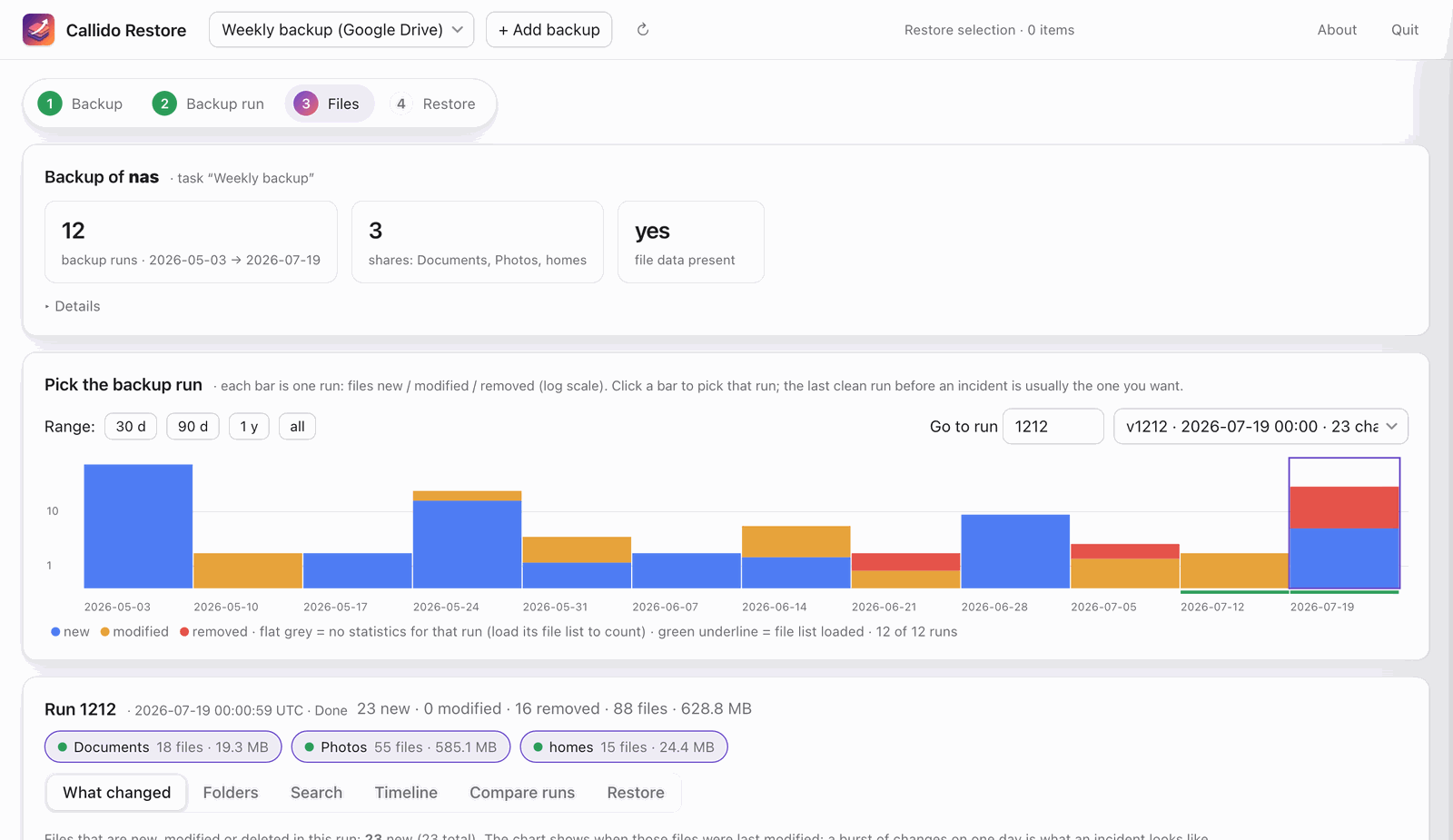
Hyper Backup is also Synology’s tool to restore those backups. Hopelessly dated, slow and anything but user friendly. Install the desktop app on a Mac and warnings and errors fly at you: it’s still an Intel app. Niels wanted to see what changed in every run, pick the last clean one and restore exactly that. It couldn’t.
So he built callido restore
Out of pure frustration Niels built his own backup explorer and recovery tool, and it’s now available to everyone. callido restore opens a Hyper Backup (.hbk) directly. No Hyper Backup, no working NAS. On Google Drive, a NAS share or a local disk.
- Every backup run on a timeline. Per run you see what was new, modified and removed. An attack stands out as a red spike at the end.
- Finds the damage.
.L0CK3Dfiles and ransom notes are flagged. - Restores what you pick: a whole run, a shared folder or a single file, to the NAS or a local folder.
- Never overwrites, never deletes. Afterwards every file gets a status: verified or not.
- Takes a beating. Laptop asleep, network gone? Press Continue and it picks up where it was.
Free, open source (MIT). macOS first, now Windows too. Not affiliated with Synology. More about the app on the project page.
For your computer
macOS
Apple silicon (M1 and later)
CallidoRestore-arm64.dmg
Download
For your computer
macOS
Intel Mac
CallidoRestore-amd64.dmg
Download
For your computer
Windows
Windows 10 and 11, 64-bit
CallidoRestore-x64.msi
Download
All downloads and install notes → Release notes v1.3.0 Checksums Source code
What you should do now
- DSM off the internet. No port forwards to the NAS. Remote access only through a VPN such as Tailscale.
- 2FA is no shield against pre-auth flaws. Turn it on, yes. Rely on it, no.
- Don’t believe the green check mark. Compare your DSM version with your model’s download page and Synology’s advisories. Fixed builds for the September flaws: DSM 7.2.1-69057-12, 7.2.2-72806-9, 7.3.2-86009-4 and 7.4-90075.
- Look for intruders. Unknown admins, odd jobs in Task Scheduler,
read-me3.txtin your folders. Updating doesn’t kick out an attacker who is already in. - Backups off the NAS, with versions. A backup on the same box gets locked with it. The Google Drive backup was the difference between losing some files and losing everything.
Sitting on an encrypted NAS with a Hyper Backup somewhere off-site? Download callido restore. Stuck? Get in touch.
Sources
- Synology-SA-24:20 (CVE-2024-10441, fixed Dec 2024)
- Synology-SA-26:13 (CVE-2026-13639, CVE-2026-13684, fixed 18 Sep 2026)
- IT-Connect: C3RB3R ransomware is hitting Synology NAS devices
- TrebSec: C3RB3R ransomware is encrypting Synology NAS devices
- Tweakers: Synology waarschuwt voor ransomware op nas’en die op verouderde firmware draaien
- Techaeris: Synology NAS ransomware alert


